Documents Are Already Digital. Why Is Manual Data Entry Still Required?
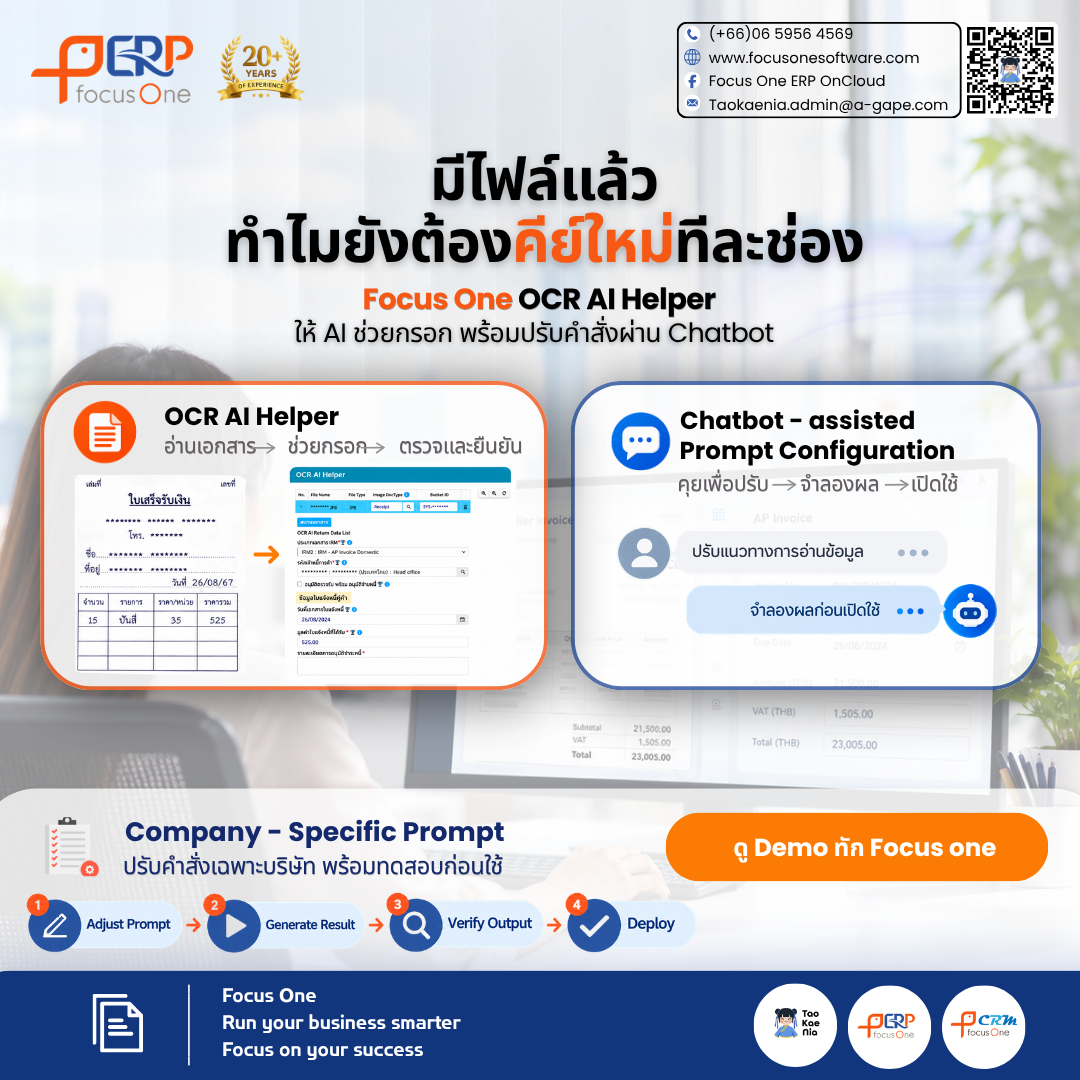
Streamline ERP Document Processing with Focus One AI OCR Helper
Even when organizations receive invoices, receipts, and expense-related documents in digital formats, entering information into an ERP system may still require extensive manual effort.
Employees often need to open documents, review individual details, switch between screens, and manually enter information into multiple ERP fields. These repetitive activities increase administrative workloads and reduce the time available for higher-value tasks.
Focus One AI OCR Helper helps streamline this process through AI-powered Optical Character Recognition (OCR) technology, which reads and extracts essential information from business documents and prepares the extracted data for relevant fields within the ERP system.
Rather than entering every detail manually, users can focus on reviewing, correcting, and confirming AI-prepared information before proceeding with the transaction.
Chatbot-Assisted Prompt Configuration
Adapting AI Document Processing to Different Business Requirements
Organizations often have different document formats, data requirements, and processing conditions. A standardized approach to document extraction may not fully address every company's operational needs.
How can organizations adapt AI document processing to their specific requirements without relying on developers for every prompt adjustment?
With Chatbot-Assisted Prompt Configuration, authorized users can describe their document processing requirements and extraction conditions through a chatbot interface. The system assists in preparing and refining AI Prompts to better align with the organization's business processes.
This capability enhances the flexibility of AI Document Processing and reduces dependency on development teams for prompt adjustments that authorized users can manage independently.
Key Capabilities of Chatbot-Assisted Prompt Configuration
1. Company-Specific Prompt — Tailored AI Instructions for Each Organization
Configure Custom AI Prompts to define document extraction and processing instructions based on company-specific requirements.
These instructions operate alongside the Standard System Prompt and apply only to the designated company, without affecting the prompt configurations of other organizations.
This approach enables greater flexibility in handling different document formats and business requirements while maintaining separation between company-specific configurations.
2. Preview & Simulate — Validate AI Prompts Before Activation
The Preview & Simulate capability allows users to test AI Prompt configurations and review the resulting document extraction outputs before applying changes to live operations.
Users can evaluate extraction accuracy, identify potential Prompt Conflicts, and refine instructions before activation.
This validation process helps reduce the operational risks associated with prompt modifications and supports more reliable AI-assisted document processing.
3. Role-Based Access Control & Activity Log — Govern and Monitor Prompt Changes
Role-Based Access Control (RBAC) enables organizations to manage permissions for creating, modifying, and activating AI Prompts according to assigned user roles.
An integrated Activity Log records configuration changes, supporting traceability and accountability.
Authorized users can review prompt modifications and manage existing instructions, including editing or deactivating configurations when necessary.
Together, these capabilities support more structured AI Prompt Governance and controlled configuration management.
Workflows for Smarter ERP Document Processing
1. AI Prompt Configuration Workflow
Chat with AI → Preview & Simulate → Review → Activate
Authorized users describe document processing requirements through the chatbot, allowing AI to assist in preparing the appropriate prompt instructions.
The proposed configuration can then be simulated, reviewed, and activated according to the organization's access permissions and approval requirements.
2. AI OCR Document Processing Workflow
Upload → AI-Assisted Data Entry → Review & Confirm
Users upload business documents for AI OCR processing. The system extracts relevant information and prepares the data for corresponding ERP fields.
Users then review, correct, and confirm the extracted information before continuing with the relevant business transaction.
This Human-in-the-Loop approach maintains human oversight while reducing repetitive manual data entry.
Enabling Flexible, Controlled, and Efficient ERP Document Processing
Integrating AI OCR with Chatbot-Assisted Prompt Configuration delivers benefits beyond reducing manual document entry.
It enables organizations to adapt document processing instructions to different formats, business rules, and operational requirements while maintaining structured control over AI configurations.
With Company-Specific Prompts, pre-activation testing, and role-based access management, organizations can manage AI Prompt configurations more systematically and support consistent document processing across business operations.
At the same time, human review and confirmation remain essential to ensuring that extracted information is appropriate for the intended ERP transactions.
Focus One AI OCR Helper combines intelligent document extraction, configurable AI instructions, and controlled ERP workflows to support more efficient business operations.
Reduce Repetitive Data Entry. Adapt AI to Your Business. Focus on What Matters Most.
Focus One
Runs Your Business
Focus on Your Success
Powered by Froala Editor


